
Technical SEO optimizes your website’s backend structure so search engines can crawl, index, and understand it effectively. Key areas include crawlability, indexability, site speed, Core Web Vitals, mobile friendliness, security, and URL management. A solid technical SEO foundation ensures that content is discovered and ranked in competitive UK search results.
Your site has good content, backlinks are in place, but rankings still won’t move. That frustration usually comes from technical SEO issues you can’t see on the surface.
Slow loading pages, mobile problems, crawl errors, or poor structure quietly block search engines from fully accessing your site. When that happens, even the best content struggles to rank in UK search results.
Studies show that more than 50% of websites suffer from technical SEO issues that prevent pages from being fully crawled or indexed, even when content quality is high, as highlighted in large-scale site audits by Ahrefs.
The focus is on identifying hidden technical issues and resolving them in a clear, structured way, allowing search engines to crawl, index, and trust the site correctly.
What Is Technical SEO (Website Foundation)
Technical SEO focuses on how search engines access, crawl, and index your website. It ensures that pages load correctly, work well on all devices, and can be understood without technical barriers. When search engines cannot properly crawl or index a site, even high-quality content fails to appear in search results.
Benefits of Technical SEO
Technical SEO creates the foundation that allows all other SEO efforts to succeed. When implemented correctly, it delivers measurable benefits beyond rankings alone.
Key benefits include:
Improved crawl efficiency, ensuring search engines focus on important pages
Faster page performance, leading to lower bounce rates and higher engagement
Stronger indexation control, preventing valuable pages from being excluded
Better mobile experience, critical for UK search behaviour
Increased trust and security signals, supporting long-term visibility
Higher return on content investment, as existing pages gain the ability to rank
Without technical SEO, content and backlinks often fail to deliver results. With it, websites become easier to crawl, understand, and rank in competitive UK search results.
What Technical SEO Includes
Technical SEO includes the core systems that allow search engines to find, process, and evaluate a website correctly. These elements control how pages are discovered, how fast they load, how they behave on different devices, and how clearly their purpose is understood.
Crawlability and Indexability
Crawlability and indexability ensure that search engines can discover your pages and store them in search results. If pages are blocked, poorly linked, or incorrectly configured, they may never appear in search, regardless of content quality.
Site Speed and Core Web Vitals
Site speed and Core Web Vitals measure how quickly pages load, respond, and remain stable during use. Slow or unstable pages reduce user trust and send negative performance signals that can limit rankings.
Mobile Friendliness
Mobile friendliness ensures that pages work properly on smartphones and tablets. Since search engines use mobile versions for ranking, missing content or poor usability on mobile directly affects visibility.
Structured Data
Structured data provides additional context about page content, such as services, FAQs, or products. It helps search engines interpret information more accurately and improves eligibility for enhanced search results.
URL Management and Security
URL management and security focus on clean URL structures, correct redirects, and HTTPS protection. These elements help maintain trust, prevent duplication issues, and ensure search engines process pages consistently.
Crawlability and Indexability – The Basics of Technical SEO
Crawlability and indexability are the first hurdles for search engines. If search engines cannot crawl or index a page, it’s essentially invisible. Here’s how you can ensure your pages are accessible.
Understanding Crawling and Indexation
- Crawling is the process where search engines discover pages through bots that follow links.
- Indexation occurs once a page is crawled, where search engines decide if it’s worthy of being stored and shown in search results.
Tools to Help with Crawlability
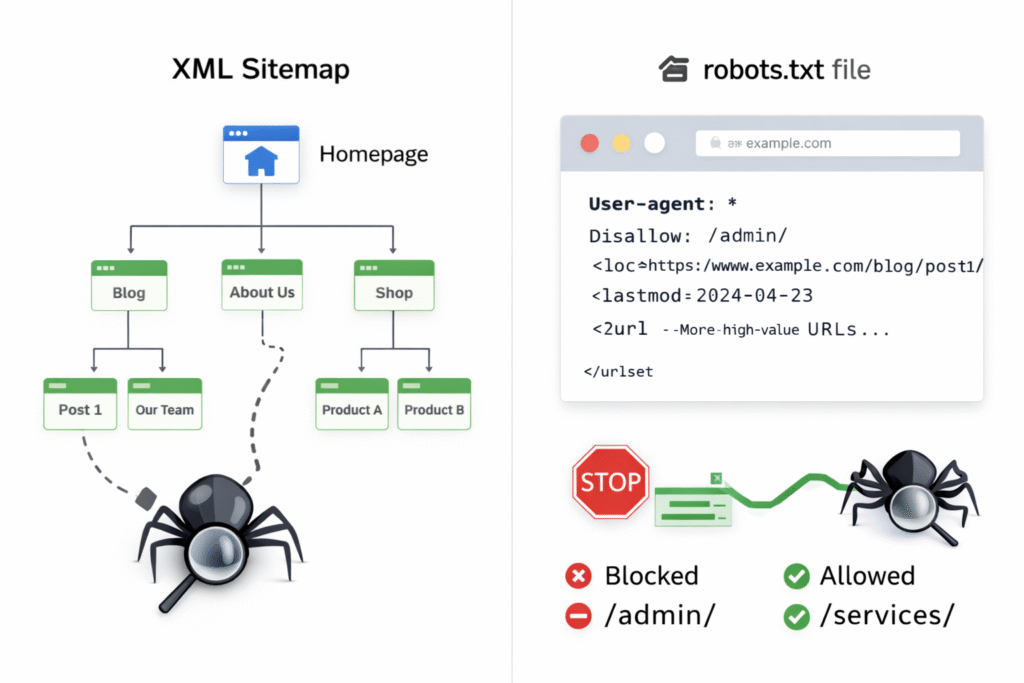
- XML Sitemaps:A roadmap for search engines to find and prioritize important pages. Make sure the sitemap is clean and only includes indexable, high-value pages.
- Robots.txt: This file dictates which pages bots should or should not crawl. Mistakes here, such as blocking important pages, can prevent search engines from properly indexing your site.
Noindex Tags and Indexation Control
Noindex tags tell search engines not to include a page in search results. While useful in some cases, incorrect use of noindex can silently remove important pages from Google’s index.
Common issues include:
Noindex applied to key pages during development and never removed
CMS or plugin settings unintentionally blocking pages
Noindex tags applied sitewide through templates
Regularly reviewing noindex usage ensures that only low-value or duplicate pages are excluded, while important pages remain eligible to rank.
Canonical Tags and Duplicate Content Management
Canonical tags help search engines understand which version of a page should be treated as the primary source. This is essential for managing duplicate or near-duplicate content.
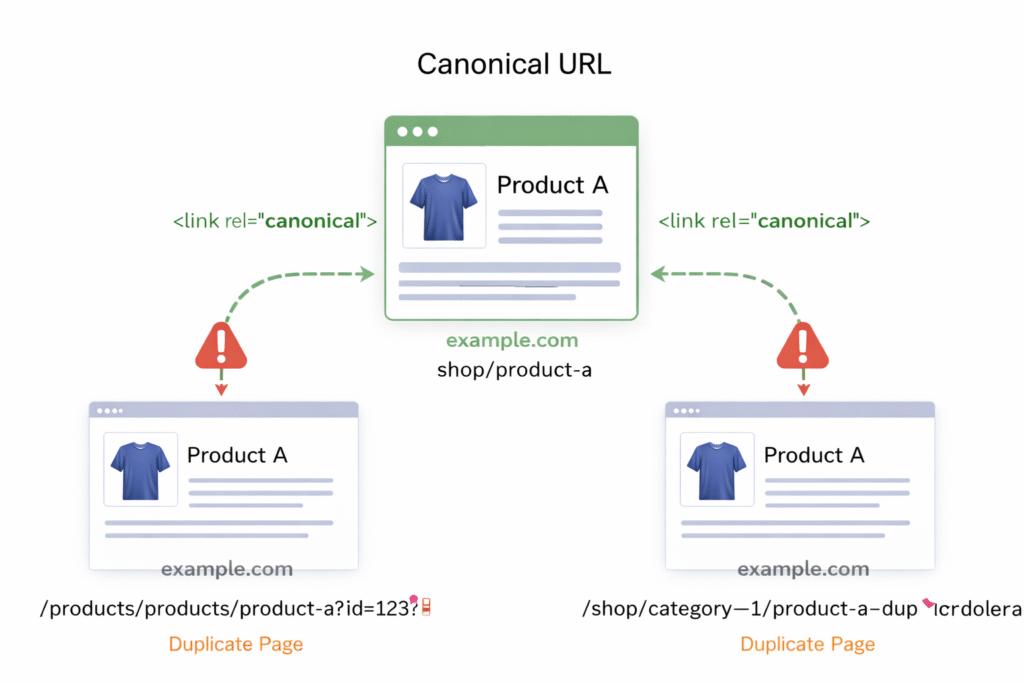
Canonical issues often occur due to:
URL parameters
HTTP vs HTTPS versions
Trailing slash inconsistencies
Paginated or filtered pages
Incorrect canonical setup can cause Google to ignore the wrong page, resulting in ranking loss. Proper canonical implementation consolidates ranking signals and protects visibility.
How Site Architecture and URL Structure Impact SEO
Site architecture refers to how your website’s pages are organized and connected. A clean, logical structure helps both search engines and users navigate your site, improving crawl efficiency and ranking.
Key Factors:
- Flat vs. Deep Site Structure: Flat structures keep key pages within 2–3 clicks of the homepage, making it easier for crawlers to access them. A deep structure buries pages under multiple clicks, making them harder to crawl.
- SEO-Friendly URLs: Use clean, descriptive URLs with keywords, and avoid complex, lengthy strings of numbers or unnecessary parameters.
A well-structured website allows search engines to prioritize key pages, improving rankings.
The Importance of Mobile SEO
With mobile-first indexing, Google ranks mobile versions of websites first, meaning any mobile issues can directly impact rankings. Given that mobile traffic makes up the majority in the UK, mobile optimization is a key component of technical SEO.
Key Mobile SEO Considerations
- Mobile-First Indexing: Ensure that your mobile version matches your desktop site in terms of content and structure.
- Mobile-Readiness Checklist: Verify that text is readable, links are tappable, and content is appropriately scaled for smaller screens.
Site Speed and Core Web Vitals
Site speed is a crucial ranking factor, as it directly impacts user experience. Slow pages result in higher bounce rates and lower engagement, negatively affecting rankings. Core Web Vitals, which focus on real user experience metrics, help measure how well a site performs in terms of loading speed, interactivity, and layout stability.
Core Web Vitals Metrics
- Largest Contentful Paint (LCP): Measures how fast the main content appears.
- Interaction to Next Paint (INP): Measures how quickly a site responds to user interactions.
- Cumulative Layout Shift (CLS): Measures how much the layout shifts during loading.
Fixing issues like oversized images, slow server responses, and excessive scripts can significantly improve these metrics and boost rankings.
To assess and monitor these metrics, performance data can be measured using tools such as Google PageSpeed Insights, Google Search Console (Core Web Vitals report), and Lighthouse. These tools provide both real-user data and diagnostic insights, helping identify issues like oversized images, slow server response times, render-blocking scripts, and excessive JavaScript execution.
Fixing Crawl Errors, Broken Links, and Redirects
Crawl errors and broken links prevent search engines from properly accessing and indexing your website. When search engines repeatedly encounter errors, they waste crawl budget on non-functional URLs instead of discovering and refreshing valuable pages. Over time, unresolved crawl issues can limit indexation, weaken internal link equity, and negatively affect rankings.
Types of Crawl Errors
3xx (Redirect) Errors
Redirects occur when a URL points to another location. While redirects are normal, improper implementation can cause problems such as redirect chains, loops, or unnecessary hops. These issues slow down crawling, dilute link equity, and can lead to poor user experience.
4xx (Client) Errors
4xx errors, most commonly 404 (Page Not Found), occur when a requested page no longer exists. Broken internal or external links leading to 404 pages disrupt crawl paths and reduce trust signals. While not all 404s are harmful, important URLs returning errors should be addressed.
5xx (Server) Errors
5xx errors indicate server-side failures that prevent pages from loading entirely. These are critical issues, as search engines may temporarily or permanently drop affected pages from the index if errors persist.
Best Practices for Fixing Crawl Errors
Audit regularly using tools such as Google Search Console, Screaming Frog, or site log analysis to identify crawl errors and broken links.
Fix internal broken links by updating URLs or replacing them with valid, relevant destinations.
Implement 301 redirects for permanently removed pages to pass link equity and maintain user experience.
Avoid redirect chains and loops by pointing old URLs directly to their final destination.
Use 404 status codes intentionally for pages that are permanently removed and have no suitable replacement.
Monitor server performance to ensure fast response times and prevent recurring 5xx errors.
Keep your XML sitemap clean, removing URLs that return errors or unnecessary redirects.
Review crawl error reports regularly to catch new issues before they affect indexation.
By maintaining a clean crawl path, fixing broken links, and managing redirects correctly, you help search engines crawl your site efficiently, preserve link equity, and ensure important pages remain indexed and visible in search results.
HTTPS and Website Security for SEO
Website security is a foundational requirement for both user trust and search visibility. Google uses HTTPS as a ranking signal, and browsers actively warn users when a site is not secure. These warnings reduce user confidence, increase bounce rates, and can indirectly harm SEO performance.
HTTPS encrypts data exchanged between the user’s browser and your server, protecting sensitive information and ensuring content integrity. Sites that fail to implement HTTPS correctly risk losing trust signals and exposing users to security vulnerabilities.
Security Best Practices
Implement HTTPS site-wide
Ensure that HTTPS is enabled across the entire website, not just on login or checkout pages. All URLs should resolve to the secure version.Force HTTP to HTTPS redirects
Automatically redirect all HTTP URLs to their HTTPS equivalents using permanent (301) redirects. This consolidates ranking signals and prevents duplicate URL issues.Eliminate mixed content issues
Check for non-HTTPS resources such as images, scripts, fonts, or embedded files. Mixed content warnings weaken security signals and may prevent pages from loading correctly in modern browsers.Maintain valid SSL certificates
Use a trusted SSL certificate provider and monitor certificate expiration to avoid security warnings or downtime.Secure internal links and canonical tags
Ensure all internal links, canonical URLs, sitemaps, and structured data reference the HTTPS version of your site.Monitor security issues regularly
Use tools like Google Search Console and server monitoring to detect security warnings, malware, or manual actions early.
A properly secured HTTPS site reinforces trust with both users and search engines, supports stable rankings, and creates a safer browsing experience. Security issues, if ignored, can quickly undermine even strong content and technical SEO foundations
Structured Data and Schema Markup for Technical SEO
Structured data helps search engines better understand the context and meaning of your page content. By using schema markup, you provide explicit signals about elements such as services, FAQs, products, reviews, and business information. This reduces ambiguity and allows search engines to interpret your site more accurately.
While structured data does not directly improve rankings, it enhances how your pages are processed, indexed, and displayed in search results. Proper implementation can also make your content eligible for rich results, improving visibility and click-through rates.
Common Structured Data Types Used in Technical SEO
Organization and LocalBusiness schema
Helps search engines understand your business entity, location, and contact details.Service schema
Defines the services offered, supporting clearer relevance for service-based queries.FAQ schema
Enables enhanced search listings when FAQs are visible on the page.Breadcrumb schema
Clarifies site hierarchy and improves crawl understanding.Product and Review schema
Adds pricing, availability, and review information where applicable.
Best Practices for Structured Data Implementation
Use schema that accurately reflects visible on-page content
Avoid marking up content that users cannot see
Validate structured data using Google’s Rich Results Test
Keep schema updated as page content changes
Ensure consistency with NAP, URLs, and canonical tags
Incorrect or misleading structured data can be ignored by search engines or trigger manual actions, making accuracy and maintenance essential.
Structured data strengthens technical SEO by improving clarity, reducing interpretation errors, and supporting enhanced search result features. When combined with strong crawlability, clean architecture, and correct indexation controls, it contributes to a more robust and future-proof SEO foundation.
Running a Technical SEO Audit Step-by-Step
A technical SEO audit is a structured review of how search engines crawl, render, index, and trust your website. The goal is not to “find random issues,” but to remove the blockers that stop Googlebot from accessing key pages, understanding site structure, and serving your content reliably in search.
Step 1 — Confirm What Google Has Indexed (Not What You Published)
Use Google Search Console’s URL Inspection tool to confirm:
Whether the URL is indexed
The selected canonical (your canonical vs Google’s canonical)
Crawling, rendering, and enhancement data (including structured data signals) Google Help+1
What to fix first
Important pages showing “Excluded,” “Crawled – currently not indexed,” or canonical mismatches
Pages blocked by
noindex, robots.txt, or authentication (common on staging and template-driven sites)
Step 2 — Audit Crawlability (Can Googlebot Access Your Key URLs?)
Start with your robots.txt rules and your XML sitemap:
Ensure robots.txt is not blocking important sections (services, blog, product/category URLs)
Ensure the XML sitemap contains only indexable, valuable URLs (no redirected, no 404, no
noindex) Google for Developers+1
Google’s systems have explicitly described (and patented) crawl scheduling that leverages signals like URL priority/status and sitemap information which is why clean, accurate sitemaps matter in real-world crawling and refresh cycles. Google Patents+1
Step 3 — Run a Crawl to Find Technical Waste (Links, Status Codes, Redirect Logic)
Crawl the site using a crawler (e.g., Screaming Frog) to identify:
Status codes that require action
4xx (404/410): fix internal links; redirect only when there is a relevant replacement
5xx: treat as urgent; persistent server errors can cause deindexing risk
3xx: remove redirect chains and loops; point old URLs directly to the final destination
Redirect best practice
Use 301 for permanent changes
Avoid redirect chains (A→B→C) because they waste crawl resources and slow discovery
Step 4 — Fix Indexability Controls (Noindex, Canonicals, and Duplicate Variants)
These two control mechanisms are frequently misused:
noindexremoves a page from search results (use sparingly and intentionally)Canonical tags consolidate duplicate/near-duplicate pages by indicating the preferred URL
Audit for:
noindexapplied to key pages via templates or SEO pluginsCanonicals pointing to the wrong URL version (HTTP vs HTTPS, trailing slash, parameter variants)
Duplicate URL variants created by filters, tracking parameters, pagination, or inconsistent internal linking
(Practical rule: if Google selects a different canonical than you do, you have a signal consistency problem like content, internal links, sitemaps, or redirects often need tightening.) Google Help+1
Step 5 — Review Crawl Budget Signals (Especially for Large UK Sites)
Use Search Console Crawl Stats to assess crawl behaviour:
Total crawl requests over time
Server response time
Availability issues during crawling Google Help+1
Google has described and patented crawler scheduling approaches that prioritise crawling based on status/priority and site signals, so improving server response, removing crawl traps, and cleaning internal linking improves crawl efficiency over time. Google Patents+1
Step 6 — Validate Page Experience Signals (Core Web Vitals and Mobile)
Treat performance as an indexing-and-engagement enabler:
Identify slow templates and heavy scripts
Fix render-blocking assets, oversized images, and slow server response
Confirm mobile usability issues are resolved (mobile-first indexing means the mobile version is the primary version assessed)
Step 7 — Verify Structured Data (Schema) Eligibility and Compliance
Structured data helps Google interpret entities and page purpose, but it must follow policy and technical guidelines. Validate with:
Rich Results Test (eligible rich result types + errors)
URL Inspection (what Google detected on the indexed version)
Key guideline reminders:
Don’t mark up content users can’t see
Don’t block structured-data pages via robots.txt or
noindexFollow general structured data policies to remain eligible for rich results Google for Developers
Step 8 — Turn Findings into a Fix Plan (Impact-First)
Prioritise fixes in this order:
Indexing blockers (robots/noindex/canonical misalignment)
Crawl waste (404s, redirect chains, crawl traps)
Performance bottlenecks (Core Web Vitals templates)
Structured data errors (eligibility and policy compliance)
Maintenance (monitoring + regression prevention)
Tools for Technical SEO Audits
Use a tool stack that matches how Google evaluates websites:
Google Search Console (indexing visibility, URL Inspection, Crawl Stats)
Screaming Frog (broken links, status codes, duplicate content patterns, blocked URLs, canonicals)
Rich Results Test (structured data eligibility/errors)
Ahrefs / SEMrush (site audit layer to surface recurring technical patterns and prioritise at scale)
Technical SEO focuses on optimising the backend structure of a website so search engines can crawl, index, and understand pages effectively.
Without strong technical SEO, even high-quality content and backlinks may fail to rank due to crawlability issues, slow performance, mobile usability problems, or security concerns.
Unresolved technical issues can prevent pages from being indexed, waste crawl budget, reduce visibility, and cause ranking losses over time often without obvious warning signs.
A full technical SEO audit is typically recommended every 3 to 6 months, with additional checks after major site updates, migrations, or CMS changes.
If rankings have plateaued, pages are not being indexed, traffic drops after updates, or performance and crawl issues persist, a technical SEO specialist can help identify and resolve underlying problems.
Technical SEO is ongoing. Websites change over time, and regular monitoring is required to prevent new issues from affecting crawlability, performance, and visibility.
Find and Fix the Technical SEO Issues Holding Your Website Back
Hidden technical SEO issues are often the reason websites fail to progress, even when content and backlinks are in place. When search engines cannot crawl, interpret, or trust a site’s technical foundation, visibility stalls and growth becomes unpredictable.
By addressing crawlability, indexation controls, site structure, performance, mobile usability, security, and structured data, technical SEO removes the barriers that prevent search engines from fully understanding your website. This creates a stable foundation where content can be discovered, evaluated, and ranked consistently in UK search results.
Technical SEO is not about chasing quick wins. It is about uncovering and fixing the unseen issues that silently limit performance. Once these issues are resolved, every other SEO effort becomes more effective, measurable, and sustainable.
Fix the Technical SEO Issues Holding Your Website Back

Ermus is an SEO specialist and content writer with 2 years of experience in driving website growth through effective search strategies and engaging content. Specializing in local SEO, on-page/off-page optimization, and semantic content, she applies Koray Tuğberk GÜBÜR’s holistic SEO methods to build authority and relevance across topics. Ermus stays ahead of the curve, constantly refining strategies to adapt to evolving search trends.